Connect Vobiz
Vobiz is the provider to pick if your business is in India. It bills in rupees with a GST invoice, rents Indian landline and mobile-format numbers as well as 140 and 160 series numbers, and keeps every call inside the country the way Indian regulation requires. Connecting it takes two values from the console, and it supports browser calling, recording and AI voice agents.
Before you start
- A Vobiz account with credit. The console lives at https://console.vobiz.ai.
- KYC completed in that console: GST for a company, PAN or Aadhaar for an individual. Vobiz will not rent an Indian number, and will not take an inbound call on a trial account, until it is done. You can connect before then; you cannot take calls before then.
- An Owner or Administrator role in WhautoVoice.
Connect Vobiz
-
Open Integrations
- In the sidebar choose Settings > Integrations, then click Connect on the Vobiz card. While Vobiz is coming soon the card sits with the other roadmap providers, reads Coming soon and does not open.
-
Copy the Auth ID and Auth Token
- Sign in at console.vobiz.ai. The dashboard shows the Auth ID and, behind an eye icon, the Auth Token. The first setup step on the right of the page links there.
- Copy the Auth ID into the form. It starts with
MA. - Click the eye icon to reveal the Auth Token and copy that too.
-
Decide about the Application ID
- Application ID (optional, auto-created) is for people who already run a Vobiz application and want WhautoVoice to use it. Your numbers and your agents' softphones both use this application, and WhautoVoice points it at itself.
- Most people leave it blank. One is created the first time it is needed, and its id fills in here afterwards.
-
Save & verify
- Click Save & verify. WhautoVoice stores the credentials (encrypted at rest) and asks Vobiz to confirm them.
- On success the badge turns to Connected and shows the name of your Vobiz account. A trial account is labelled as such, as a reminder that inbound calls stay blocked until KYC is complete.
- On failure it reads Saved, but not verified with the error Vobiz returned. Correct the value and click Save & verify again.
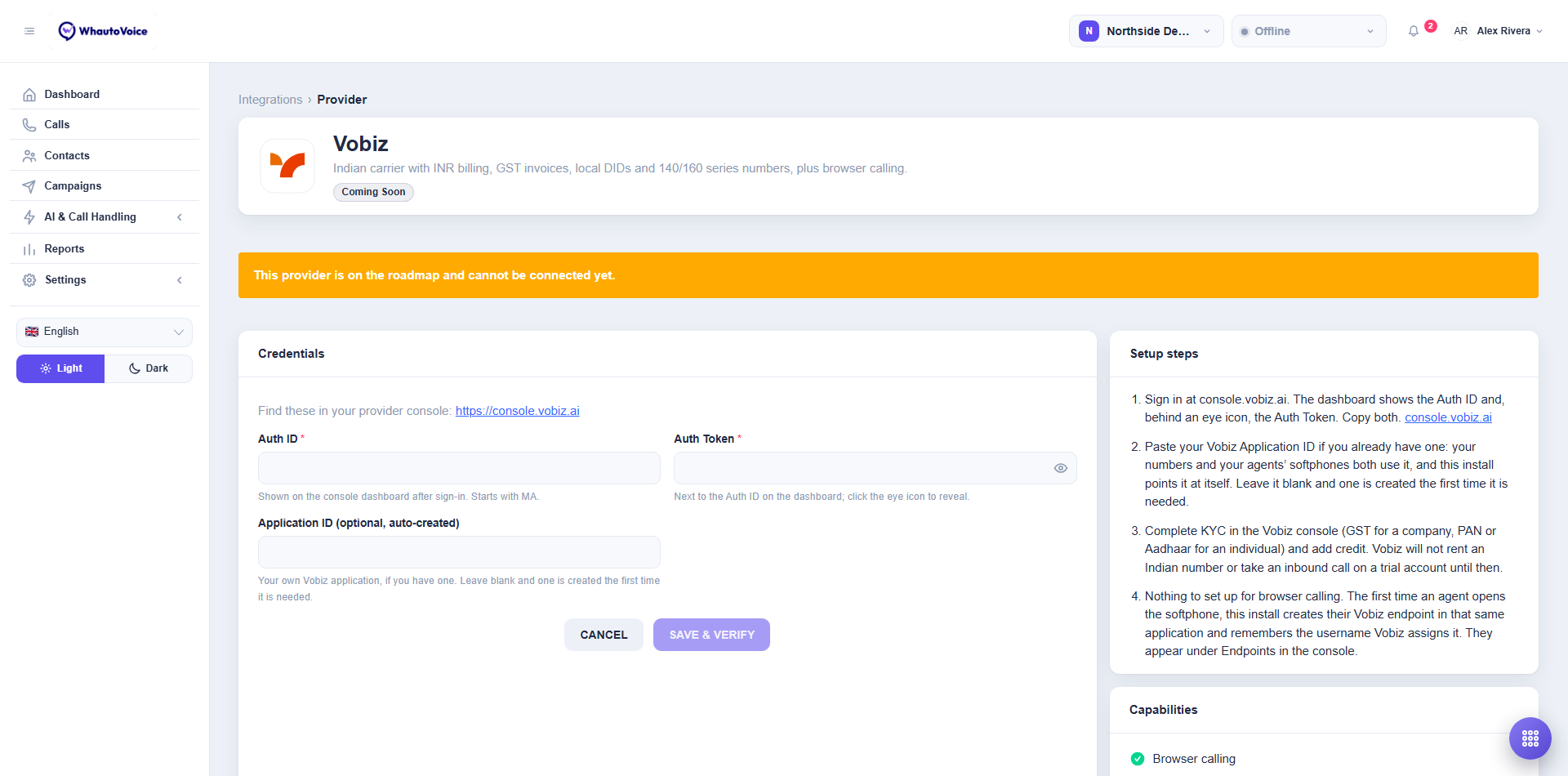
The credential fields
| Field | Where it is in the Vobiz console | What it is for |
|---|---|---|
| Auth ID | The dashboard, straight after sign-in. Starts with MA. | Identifies your Vobiz account. |
| Auth Token | Next to the Auth ID on the dashboard; click the eye icon to reveal. | Proves the account is yours and lets WhautoVoice configure numbers and softphones. It is also what WhautoVoice uses to check that every call event really came from Vobiz. |
| Application ID (optional, auto-created) | Applications, if you already have one. | The Vobiz application your numbers and softphones use. Leave blank and WhautoVoice creates one for you. |
Browser calling and endpoints
There is nothing to set up for browser calling. The first time an agent opens the softphone, WhautoVoice creates their Vobiz endpoint inside the application above and remembers the username Vobiz assigns it. From then on that agent's calls go through their own endpoint.
You can see these endpoints in the Vobiz console under Endpoints. Leave them alone: deleting one there, or changing its password, means that agent cannot take calls until they reopen the softphone.
Vobiz has no mobile SDK and no push notifications, so the WhautoVoice mobile app runs the same browser softphone inside the app. It rings while the app is open and in front of the agent, not from a locked phone. Agents on a Vobiz number who need to be reachable on the move should keep the app foregrounded, or take a Twilio or Telnyx number for that role.
Numbers and Indian regulation
- Buy number searches Vobiz's inventory for the country you pick. Indian numbers need KYC first, and Vobiz charges a one-time setup fee equal to a month's rental on most numbers.
- 140 and 160 series numbers (promotional and transactional calling) are not bought from inventory. Vobiz assigns them after DLT registration, which takes a few weeks; once they are on your account, Import owned brings them in. Neither series can receive calls, so pair them with an ordinary Indian number for inbound.
- Caller ID on a call placed from India must be a Vobiz Indian number. Set the workspace's outbound caller number to one of them.
- Both ends of a domestic call stay in India. Vobiz ends a call that bridges an Indian leg to one anchored abroad with the reason "violates media anchoring". The browser softphone registers with Vobiz directly, so an agent in India is fine; an AI engine region outside India may not be. Pick an Indian region for the engine where one is offered.
- Cold calling is prohibited in India. Use outbound campaigns only with consent, or Vobiz can suspend the account.
WhatsApp calling on Vobiz
Vobiz can receive WhatsApp calls. When you turn calling on for a WhatsApp number and pick Vobiz as the carrier, WhautoVoice creates a SIP trunk on your Vobiz account with the password WhatsApp issues, and points WhatsApp at it. Calls from WhatsApp users then arrive like any other inbound call.
Two limits, both stated in the app when you pick the carrier:
- Calling a WhatsApp user back is not available on Vobiz. Its call documents carry no SIP password, and WhatsApp requires one on every call the business starts. Use Telnyx or Twilio for a number that needs both directions.
- This path has not yet been proven against a live WhatsApp call the way Twilio and Telnyx have. Trunks are created and credentials installed by the API, and the first live call will confirm the routing.
The Capabilities panel
Vobiz ticks Browser calling, Call recording, Call transfer, SIP dial-out (AI bridge), Answering machine detection and Conference. The one thing missing is transcription.
The Transcribe calls option is not available on Vobiz numbers for now. Recordings work as normal. If you need transcripts, put that number on Twilio, Plivo or Vonage. See Provider limitations.
What happens next
- Go to AI & Call Handling > Phone Numbers. Click Buy number to get a new one through Vobiz, or Import owned to choose which of the numbers already on your Vobiz account this workspace answers. WhautoVoice points each number at itself. See Phone numbers.
- Give each number a routing so it answers. See Call routing.
Disconnect Vobiz
Click Disconnect at the top right of the provider page. The stored credentials are removed from this workspace and your call history is kept. The button is greyed out while phone numbers still use these credentials or calls are live on them. Release or remove those numbers first; the note under the button says how many and links to Phone numbers.
Related
Email us at hello@whautovoice.com and we will get you sorted.