Presence and availability
Your presence is a promise about whether you can take a call right now. Queues, AI agent handoffs and transfers all read it before they ring anyone, so keeping it honest is the single biggest thing you can do to stop callers waiting.
The presence selector
The selector sits in the header next to the workspace switcher. It shows a coloured dot and your current state. Click it to open the list and choose another state; a tick marks the one you are in.
| State | Colour | When to use it |
|---|---|---|
| Available | Green | You are at your desk with a headset on and ready for the next call. |
| Busy | Red | You cannot be interrupted. Nothing rings you until you change it back. WhautoVoice sets this for you while you are on a call. |
| Wrap-up | Amber | You are finishing notes on the call you just ended. WhautoVoice sets this when you hang up and clears it when the after-call timer runs out. |
| Offline | Grey | You are off shift. Choose it before you close the tab so nobody tries to ring an empty chair. |
While you are in Wrap-up a countdown shows next to the state and an I'm back button appears beside the selector. Click it to end after-call work early and go straight back to Available.
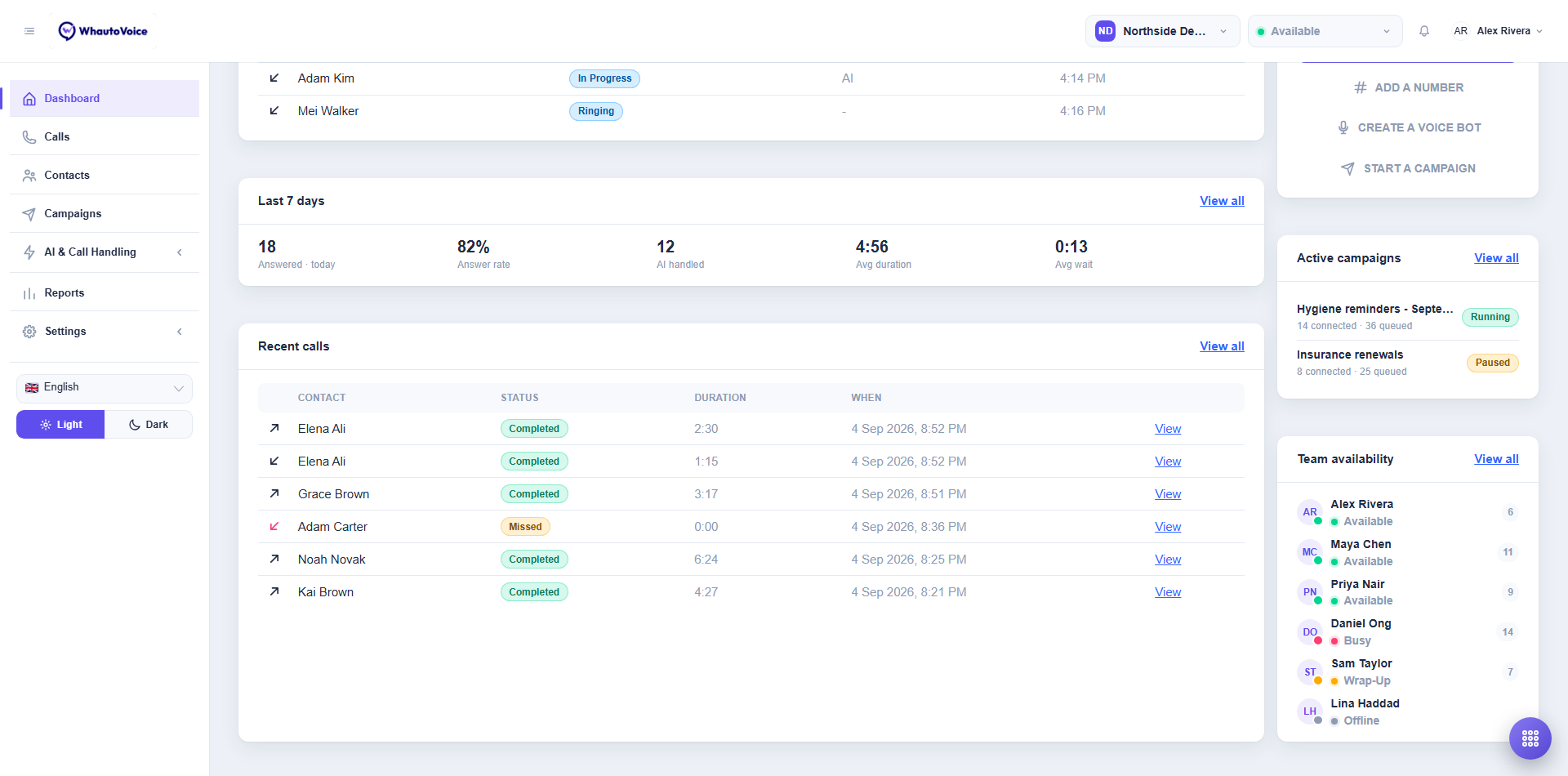
The screenshot shows Alex at Northside Dental set to Available in the header, and the Team availability card on the dashboard listing every teammate with their state.
How presence affects routing
Only two states can be rung: Available and Wrap-up.
- A call queue rings its Available members first, in the order its strategy decides, then its Wrap-up members. Someone finishing their notes is still at their desk, so a caller who asked for a person reaches them rather than voicemail.
- Busy agents are never rung. A second call in the ear of someone mid-conversation costs two callers to save one.
- Offline agents are never rung.
- When a teammate opens Transfer in the softphone, the To an agent tab lists everyone, but only Available and Wrap-up agents can be chosen.
- When an AI voice agent hands a call to the team and nobody in the queue is ringable, the caller is held and a Caller waiting for an agent alert goes to everyone in the workspace.
If a call rings you and you do not answer, it moves on to the next agent in the queue and your presence goes back to what it was before.
Automatic changes
You do not have to touch the selector during a normal shift. WhautoVoice moves you along on its own.
| Trigger | What happens |
|---|---|
| You answer or place a call | You become Busy so the queue skips you. |
| A transfer or handoff picks you | You become Busy the moment you are chosen, even before the caller is moved, so a second call cannot land on you in between. |
| The call ends | You move to Wrap-up and the after-call timer starts. The default is 2 minutes. When it runs out you return to Available without doing anything. |
| Your browser goes quiet | If the tab has been closed, the laptop is asleep or the network has dropped for longer than the idle timeout, you are marked Offline so calls stop ringing an empty seat. The default is 3 minutes. |
Both timers are set per workspace by an Owner or Administrator under Settings > Call handling. After-call work can be turned off with No timer, in which case Wrap-up stays until you click I'm back. Mark an agent offline after can be set to Never, in which case you stay as you last set yourself even if your app has closed. See Call handling settings.
Set yourself to Offline before you leave. If the idle timeout is switched off, an agent who simply shuts the laptop stays Available all night and every call to the queue tries them first.
Seeing the whole team
- Dashboard > Team availability lists every member of the workspace with their presence dot, their state and the number of calls they have handled today. The header reads, for example, 3 of 6 available. Click View all to open the Team page.
- Settings > Team has a Softphone column showing the same presence for every member. Only Owners and Administrators can open this page.
- The dashboard tile Agents available counts the people who could take a call right now.
Related
Email us at hello@whautovoice.com and we will get you sorted.