How to change your plan
Plans are changed from the plan picker, and payment details are managed in the billing portal. Only Owners and Administrators can do either.
Open the plan picker
Go to Settings > Subscription & usage and click Change plan.
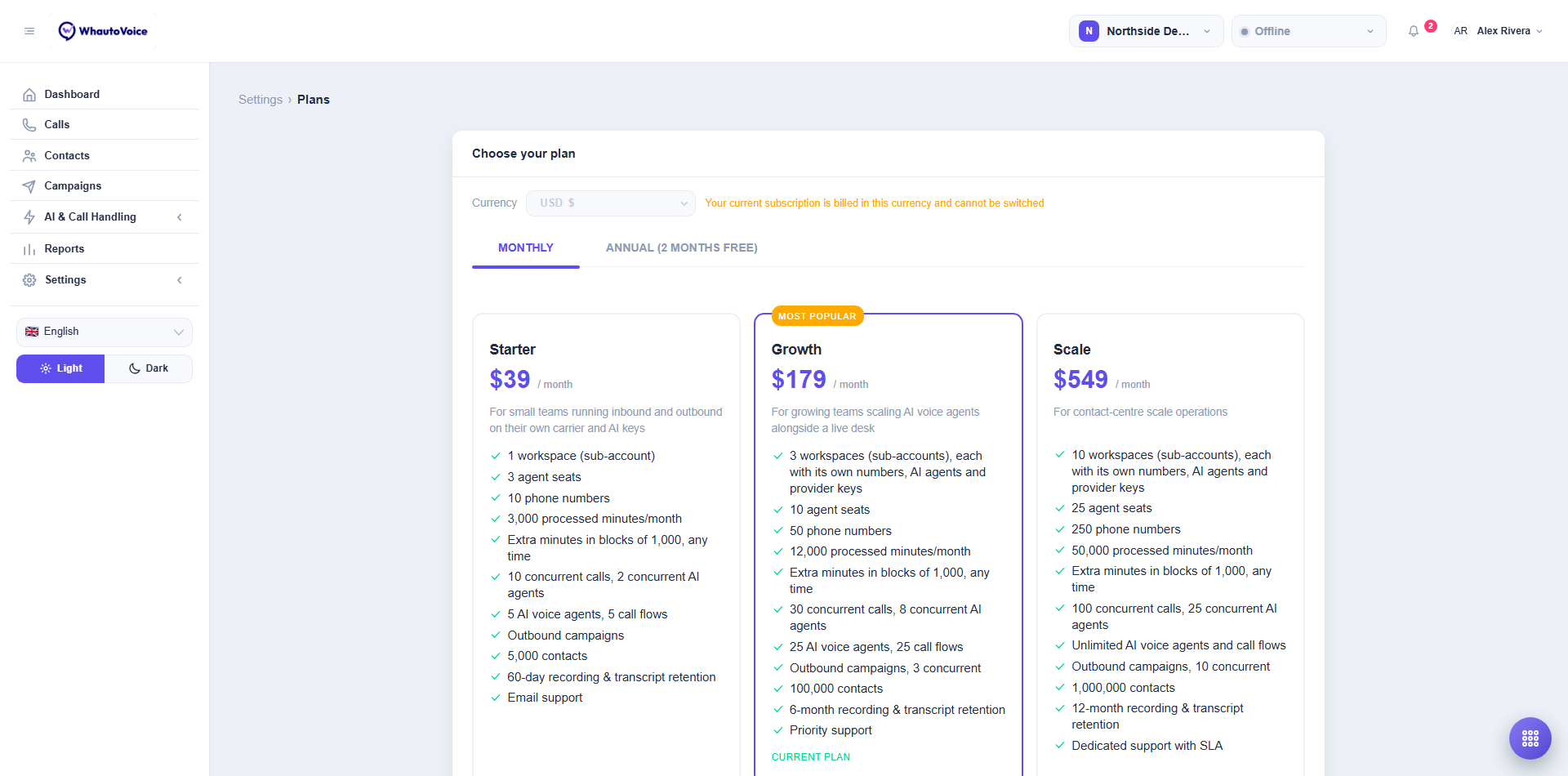
Choose a plan
- Check the Currency
- The currency suggested for your region is selected. You can change it until a subscription exists; after that it is locked.
- Pick Monthly or Annual (2 months free)
- Pick a plan
- Most popular marks Growth. Current plan marks the one you are on. Every limit is listed on the card; see Understanding subscription plans for the full comparison.
- Add add-ons
- Under Add-ons, set the quantity of extra seats, minutes, workspaces or numbers.
- Enter a Promo code
- Click Apply. Code applied confirms; Code not valid means it has expired or does not apply to this plan.
- Review Due today and Next billing date
- When you are upgrading mid-cycle, the amount due today is prorated.
- Click Subscribe (first plan) or Update subscription (changing plan)
- A first subscription goes through a secure checkout page for card details. A change to an existing subscription is applied immediately and confirmed with Subscription updated.
Upgrades and downgrades
- An upgrade takes effect straight away. New allowances apply to the rest of the current cycle.
- A downgrade must fit: you cannot move to Starter with 4 workspaces or 20 numbers. Release numbers, remove workspaces or seats first, then downgrade. The lower price applies from the next renewal.
- Switching Monthly to Annual starts a new annual term today with credit for the unused part of the month.
Manage your subscription
Manage subscription on the Subscription & usage page opens the billing portal, where you can:
- Update the card or payment method.
- Download invoices and receipts.
- Change the billing email.
- Cancel the subscription. It stays active until the end of the paid period, then lapses. See Usage and allowances for what a lapsed account can and cannot do.
Self-hosted or reseller accounts
If your WhautoVoice is run by a platform operator, the subscription page says "Billing is managed by your platform operator" instead of showing plans. Contact your operator to change limits.
Related
Need help?
Email us at hello@whautovoice.com and we will get you sorted.